Astro Vintage Free Tape & Vinyl Texture Plugin
Inject analog warmth, instability, and lo-fi grit into your digital tracks with this free texture effect
Modern digital audio is pristine, but sometimes it lacks the warmth and unpredictable character of vintage hardware. Astro Vintage, developed by Nairo Collective and released through Imperium Sounds, is a free tape and vinyl texture plugin designed to bring authentic analog wear, wow & flutter, and vinyl dust directly into your DAW. It is a lightweight, resizable, and highly intuitive tool that serves as a free introduction to the developer’s full-featured Artesano plugin.
Add Vintage Wear and Degradation
Astro Vintage offers an accessible way to degrade your audio signals with organic vintage imperfections. Whether you want to add a subtle tape drift to glue a track together or go full-blown lo-fi with digital bit crushing and crackling vinyl noise, this plugin delivers. It splits its processing into pitch drift and signal degradation, allowing you to blend the perfect amount of vintage wear to suit your mix.
Features & Controls
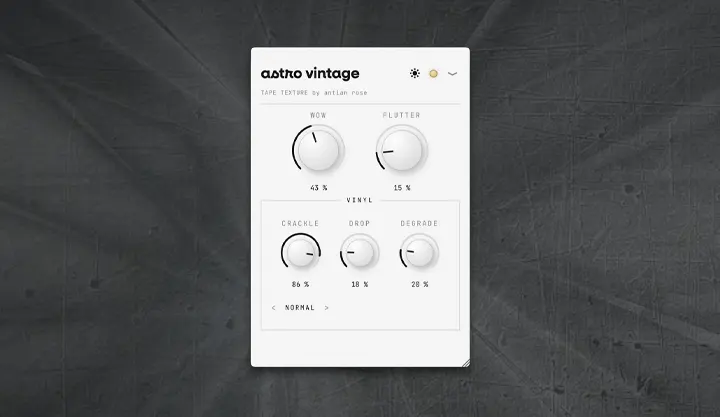
- WOW: Controls slow, tape-style pitch drift. It introduces a gentle, “seasick” movement to the sound. The speed is fixed at an analog-accurate 1.00 Hz.
- FLUTTER: Adds fast, micro-pitch variations that create shimmer and high-frequency instability. The speed is fixed at 25.00 Hz.
- CRACKLE: Introduces vintage vinyl surface noise over the signal. It features a secondary selector below the knob to toggle between ‹ Normal / Soft / Noisy › characters.
- DROP: Simulates random, smooth level dropouts, recreating the physical behavior of a tape machine momentarily losing contact with the tape head.
- DEGRADE: A sample-rate reducer (lo-fi) equipped with an anti-alias filter. Turning the knob up results in a grittier, digitally crushed signal.
- Theme Toggle: A Sun / Moon button switches the user interface between Light and Dark visual modes.
- Active/Bypass LED: Located in the top-right corner. A glowing amber light means the effect is active, and turning it dark puts the plugin in bypass mode for A/B comparison.
- Multilingual Interface: A dropdown menu (▾) allows you to set the UI language to English (EN), Spanish (ES), German (DE), or Japanese (JA).
- Resizable Window: Simply drag the bottom-right corner to scale the plugin to fit your screen.
Note: The WOW and FLUTTER rates are locked on purpose. For independent speed controls, three extra modules (Color, Movement, Space), and deeper customization, check out the developer’s paid flagship plugin, Artesano.
Tips for Using Astro Vintage
- Subtle Glue: Keep all knobs low (between 10% and 25%) to add cohesive analog character to instrument groups, backing vocals, or drums.
- Dusty Lo-Fi Beats: Push the DEGRADE and CRACKLE knobs to create dusty, sampled textures on keyboards, pianos, and drum loops.
- Tape Wobble / VHS Effect: Combine a healthy dose of WOW (for pitch warping) with a touch of FLUTTER (for shimmer) to achieve an unstable, vintage VHS tape vibe.
Formats and Compatibility
Astro Vintage is available for both Windows and macOS systems. For Windows users, it is provided in VST3 format (installed via setup .exe). For macOS users, it supports both VST3 and AU (Audio Unit) formats (installed via .dmg package). The plugin is 100% free and does not require registration, an account, or internet verification.
Astro Vintage is a gorgeous, straightforward, and incredibly useful tool that belongs in the folder of any producer working with lo-fi beats, synthwave, sound design, or indie rock. It successfully captures the organic, dusty imperfections of physical media and packages them into a beautifully designed, free-of-charge interface.