PianoFall The Free Browser-Based Piano Visualizer & MIDI Learning Tool
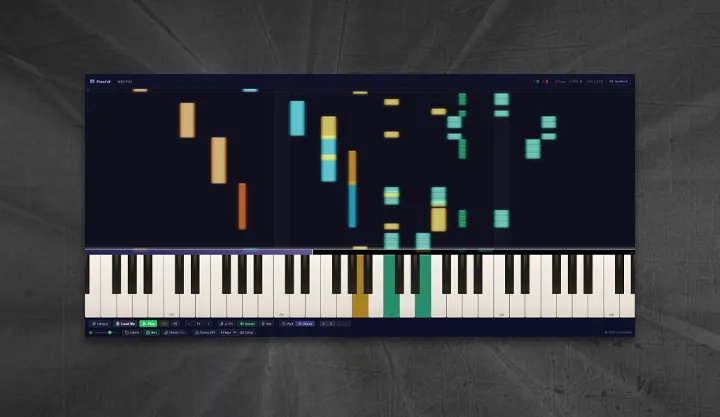
Getting piano notes and MIDI arrangements displayed properly used to mean paying for Synthesia or hunting for an obscure desktop app
PianoFall changes that — it’s a completely free, browser-based piano visualizer that runs without installation, account creation, or subscription. Open the link, drop a MIDI file, and watch the notes fail.
PianoFall is built for musicians who want to learn songs, visualize their MIDI compositions, or simply enjoy watching a piece play out Synthesia-style in the browser. Whether you’re a producer checking how your arrangement looks, or a piano student trying to nail a difficult passage, it’s got you covered.
Key Features:
- MIDI Visualizer: Drop any .mid or .midi file and see notes fall toward a piano keyboard, color-coded by track. No upload, no processing — everything stays on your device.
- Play-Along Modes: Three modes — Watch (full auto-play), Wait (pauses until you play the correct note), and Free — let you choose between passive listening and active practice.
- MIDI Keyboard Support: Connect any USB MIDI controller via Web MIDI API in Chrome or Edge and play in real time, with hit/miss scoring and combo tracking.
- Microphone Input: No MIDI keyboard? PianoFall listens through your microphone and scores acoustic instrument input in real time.
- Speed Control & Looping: Slow down to 0.5× for difficult passages, set A/B loop markers, and repeat sections until they’re locked in.
- Sheet Music: A live grand staff (treble + bass clef) renders and scrolls in sync with playback — no transcription needed.
- Built-In Classical Pieces: 8 public-domain songs ready to play, including Für Elise, Moonlight Sonata, Clair de Lune, and Toccata & Fugue in D minor.
Compatibility: Runs in any modern browser. Chrome or Edge recommended for MIDI keyboard support. No download, no account, no cost.
PianoFall is free to use at pianofall.app. Send feedback to info@pianofall.app
🎹 Go to PIANOFALL