TimeShape – Time & Volume Shaper Free
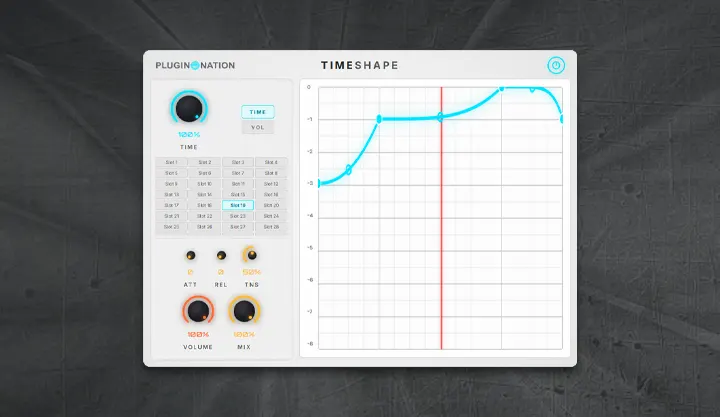
Meet TimeShape, a powerful time-manipulation and volume-shaping plugin designed to bend rhythm and time in creative ways. Similar to classic stutter or glitch effects (like Gross Beat), TimeShape allows you to draw custom curves on a 4-beat grid perfectly synced to your DAW’s tempo.
Whether you want to create classic vinyl tape-stops, intricate sidechain ducking, trance gates, or complex rhythmic stutters, TimeShape gives you total, visual control over the flow of your audio.
Features:
TIME & VOL Envelopes: Switch between manipulating the playback speed (to create pitch-downs, tape stops, and stutters) or the Volume envelope (for gating, tremolo, and sidechain pumping).
Drawable Grid with Tension: Add, drag, and curve your points on the grid to create exactly the rhythmic shape you need.
28 Automatable Slots: Store up to 28 unique time and volume shapes per instance. Automate the “Active Slot” parameter in your DAW to switch rhythmic patterns dynamically during your track!
Global Smoothing & Mix: Use the global TIME and VOLUME depth knobs to dial in the perfect amount of effect, and use the Attack/Release controls to eliminate unwanted audio clicks on sharp transitions.
Compatibility: Windows (64-bit) VST3. Compatible with FL Studio, Ableton Live, Studio One, Reaper, Logic Pro, Cubase, etc.
Plugin Nation offers hundreds of completely free and legal music production plugins for you to download directly from their developers. Now we’re taking it a step further by publishing and sharing our own free plugins!
💖 Support Plugin Nation! All our plugins are 100% free forever. If you love using this plugin in your tracks and want to support the continued development of more free tools, consider joining our Patreon family! 👉 Plugin Nation — Music Production DAW Add-ons | Patreon
👉 Take a look at all our original plugins
TimeShape User Manual – Features and Controls
1. The Envelope Grid (Right Panel)
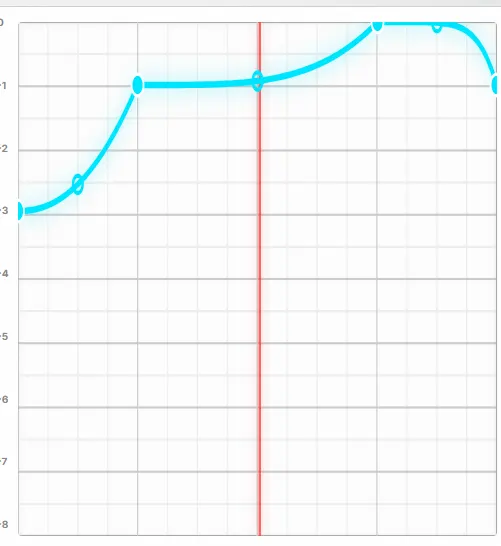
The central grid represents a 4-beat measure, perfectly synced to your DAW’s tempo.
- You can add points by clicking on the lines, and drag them to create shapes.
- Drag the lines between points to change the tension (curve) of the segments.
- Double-click a point to delete it.
2. Envelope Modes (TIME vs VOL)
Use the [TIME] and [VOL] toggle buttons on the left to switch between editing the Time envelope and the Volume envelope.
- TIME Envelope: Manipulates the playback speed and position of the audio. Dropping the curve downwards will create a “tape stop” or pitch-down effect, while sharp jumps will create stutters.
- VOL Envelope: Manipulates the volume of the audio. Use it for sidechain-style pumping, gating, or tremolo effects.
3. Slots (1 to 28)
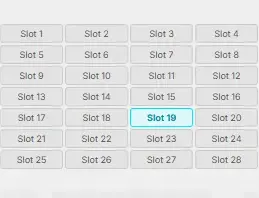
TimeShape gives you 28 slots per instance. Each slot stores a unique drawing for the grid.
- Click any slot to recall its shape instantly.
- You can automate the “Active Slot” in your DAW to switch between different rhythmic patterns dynamically during your song.
- Note: Slots only save the grid shapes. The knobs at the bottom are global parameters.
4. Global Knobs (Left Panel)
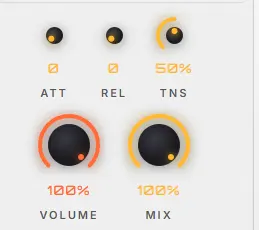
- TIME (%): Controls the overall depth of the Time envelope. At 100%, the time-bending effect is fully applied. At 0%, the Time envelope has no effect.
- VOLUME (%): Controls the overall depth of the Volume envelope.
- MIX (%): Controls the Dry/Wet balance of the entire plugin. At 100%, you hear only the processed signal.
- ATT (Attack in ms): Smooths out the beginning of the effect envelope to prevent clicks.
- REL (Release in ms): Smooths out the end of the effect envelope.
- TNS (Tension %): Adjusts the curve of the global smoothing envelope. 50% is linear.
5. Bypass

Click the power button in the top right corner of the header to bypass the plugin.
Tips for Best Results
- For classic Vinyl/Tape Stop effects, draw a straight diagonal line going downwards in the TIME envelope.
- For Trance Gating, use the VOL envelope and draw square-like steps.
- If you hear audio clicks when the grid jumps sharply, slightly increase the ATT (Attack) and REL (Release) knobs to smooth the transitions.