DarkQ FREE 24-Band Dynamic Parametric EQ
Designed as the everyday workhorse parametric EQ
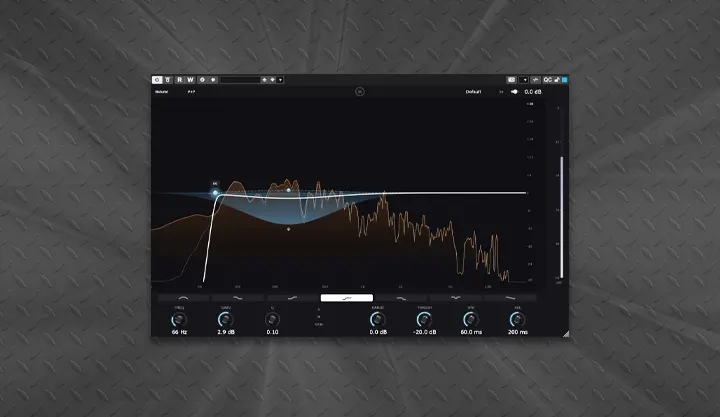
DarkQ is a 24-band parametric equalizer with full dynamic processing per band, M/S placement, and a real-time spectrum analyzer with PRE/POST visualization. Surgical enough for corrective work, musical enough for tonal shaping, fast enough to use on every track without thinking — DarkQ covers the full range of EQ duties from broad shelving on a master bus to dynamic taming on a vocal to surgical resonance hunting on cymbals.
24 Independent Dynamic Bands
Each of the 24 bands is fully featured and independent. Per-band controls include Frequency, Gain, Q, Solo, Bypass, and Dyn (dynamic mode toggle). Seven filter types are selectable per band via icon buttons:
- Bell — standard parametric peak/cut
- Low Shelf — bass shelf
- High Shelf — treble shelf
- Low Cut (HPF) — high-pass filter
- High Cut (LPF) — low-pass filter
- Notch — surgical narrow-band cut
- Tilt Shelf — full-spectrum tilt around band frequency
Dynamic EQ Per Band
Every band can be turned into a dynamic EQ at any time by engaging the Dyn button. Each band gets its own dynamic controls: Range (the maximum dynamic gain change), Thresh (detection threshold), Attack, and Release — letting you build dynamic EQ moves like de-essing, resonance taming, transient enhancement, or program-dependent tonal shaping on a per-band basis.
Phase Mode
Two global phase modes selectable from a top-bar dropdown:
- Zero Lat — minimum-phase IIR processing, no added latency, classic analog feel
- Natural — minimum-phase with phase-coherent crossovers, transparent for general mixing
Spectrum Analyzer
A real-time spectrum analyzer with selectable display modes via dropdown:
- PRE — input spectrum only
- POST — output spectrum only
- P+P — both pre and post spectra overlaid for direct visual comparison of EQ moves
A Gain Scale button cycles the analyzer’s vertical resolution for fine-tuned visual analysis. Click and drag directly on the EQ display to interact with bands visually.
Output Section
Output slider for final makeup gain, Bypass for true bypass A/B comparison, Presets browser button for instant access to factory and user presets, and a + button for saving the current state as a custom preset.
Resizable Window
Drag the corner resizer to scale the editor to any size — from compact for tight screen real estate to fullscreen for detailed EQ work.
Format & Compatibility
VST3 and AU, 64-bit, Windows and macOS (Universal Binary, Apple Silicon native).