Mixing Cheat Sheet Free In-DAW Guide
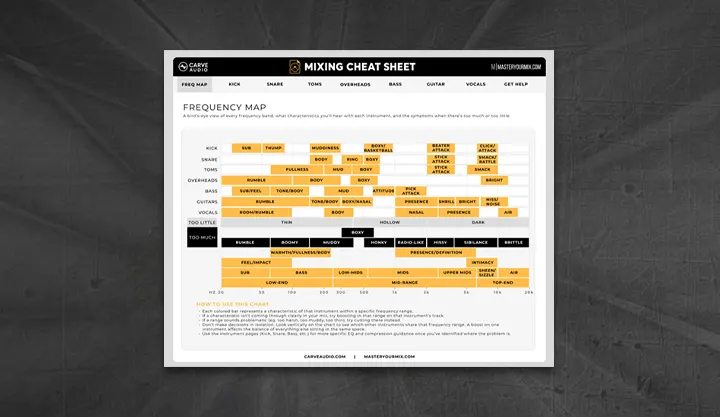
Are you tired of switching back and forth between your DAW and a messy PDF to check frequency ranges? Carve Audio has come up with a brilliant solution. The Mixing Cheat Sheet is a completely free, interactive plugin that places essential EQ and compression guidelines right where you need them: inside your mixing session.
Instead of being a traditional audio effect that alters your signal, the Mixing Cheat Sheet acts as an educational companion and a quick reference tool to help you make better mixing decisions faster.
Key Features of the Mixing Cheat Sheet:
- Interactive EQ Frequency Charts: Stop guessing where the “mud,” “warmth,” or “air” lives. This plugin provides specific frequency breakdowns for crucial elements like vocals, kick drums, bass, and guitars, helping you know exactly where to cut or boost.
- Compression Starting Points: Getting compression right can be tricky. This tool offers practical advice and starting points for attack, release, and ratio settings depending on the instrument and the dynamic control you want to achieve.
- In-Context Ear Training: By having the cheat sheet directly on your channel strip, you can read the theory and immediately listen to the results in your actual mix. This direct association is one of the fastest ways to train your ears.
- Seamless Workflow: It eliminates the distraction of leaving your DAW to look up technical references, keeping you in the creative zone.
Whether you are a beginner learning the ropes of audio engineering or a seasoned producer who wants a quick reference tool on hand, this plugin is incredibly useful.